
Female dentist working on a patient in a modern dental office with bright lighting. Dental website marketing: a practical guide for 2027
Photo by SHVETS production on Pexels

Guides

Dental website marketing: a practical guide for 2027

dental website marketing in 2027 connects useful patient tasks, accurate claims, accessible design, privacy controls, local discovery, measurement, and ownership.

What to take away

  • Build the site around patient tasks and evidence, not decoration.
  • Treat forms, tracking, claims, accessibility, and vendor access as controlled risks.
  • Measure completed actions and qualified inquiries, not traffic alone.
  • Keep the domain, content, analytics, and recovery access under practice control.
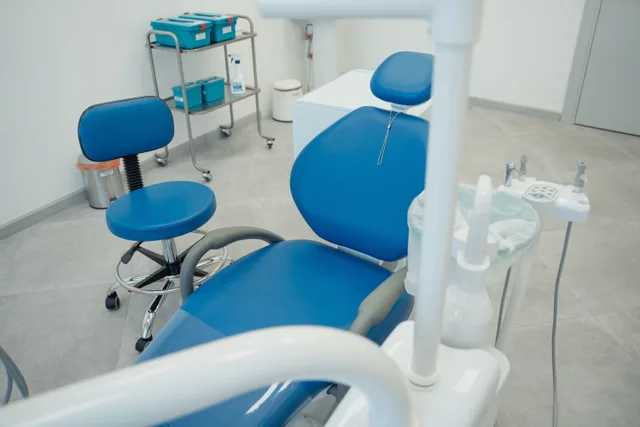
A dental operatory with treatment chairs, equipment, lighting, and a desk in Dubai.
Dental office at NMC Medical Centre in Dubai, photographed by Challiyan on May 1, 2023. Wikimedia Commons lists a 2,528 by 1,720 pixel original under CC BY-SA 4.0; this downloaded copy is unmodified. The setting illustrates the real service environment a dental website must represent and is not an endorsement. Removed on the author's request. Wikimedia Commons record for the Dubai dental office

Dental website marketing is the planned use of a practice website to help the right person understand the practice, complete a useful task, and make an informed contact. The website is not merely an online brochure. It is a public service surface, a publishing system, an advertising asset, and often a route through which people may share sensitive information.

A sound 2027 program begins with patient needs and practice capacity. It does not begin with a new theme, an arbitrary traffic target, or a vendor's ranking promise. The practice should define whom it can responsibly serve, what those people need before contacting the office, which claims it can prove, and what happens after each call, form, or appointment request.

Set one operating brief before redesigning

Write a brief that names the business objective, intended audience, service area, priority services, excluded requests, access needs, approved claims, conversion actions, content owners, technical owner, privacy reviewer, baseline measures, budget, and stop conditions. For a multilocation group, identify which facts belong to the organization and which must remain location-specific.

Decision Question Evidence
Audience Whom can this practice serve well? Capacity and patient research
Task What must a visitor accomplish? Calls, forms, and staff interviews
Promise What can the practice support? Policies and approved records
Route Where does each action go? Tested workflow
Measure What indicates useful progress? Defined events and outcomes
Owner Who approves and maintains it? Named role and review date

Inventory the website as it exists

Crawl the public site and record every indexable page, redirect, form, phone number, location, clinician profile, service claim, image, document, script, tag, account, integration, language version, and legal notice. Add traffic and inquiry evidence where it exists. Mark content as keep, correct, combine, retire, restrict, or investigate. Preserve redirects for useful retired URLs.

Then test the site as a person would. Use a phone and desktop, keyboard navigation, zoom, screen-reader spot checks, slow connections, and common browsers. Call every displayed number. Submit every form with fictional data. Confirm the destination, response, error behavior, consent text, after-hours handling, and analytics event.

Design around patient questions and actions

A visitor may need to identify the practice, confirm a location, understand a service, compare practical considerations, request an accommodation, check accepted payment arrangements, prepare for a visit, or contact the office. Give each important task a clear page and a visible next step. Avoid making a person decode internal department names or promotional slogans.

  • Home page with clear identity and service area
  • Location pages with unique verified facts
  • Service pages that explain scope without diagnosing
  • Clinician pages with current credentials and roles
  • New-patient and accessibility information
  • Contact routes with expectations and alternatives
  • Policies and notices appropriate to the practice
  • Editorial ownership and review dates

Make every claim supportable

Create a claim register for superlatives, outcomes, experience, technology, pricing, availability, credentials, testimonials, before-and-after material, and comparative statements. Record the exact wording, evidence, scope, owner, approval date, and next review. Remove a claim when its evidence expires or the underlying service changes.

Educational content should state what it can and cannot establish. Explain options and questions without presenting a web page as individualized diagnosis. If a service has material limitations, dependencies, or eligibility requirements, do not bury them behind a strong headline. Align the page with the conversation the team can actually deliver.

Run a legal and risk review

The American Dental Association's checklist for reviewing dental website legal risks identifies practice information, legal notices, permissions for images and third-party content, advertising claims, accessibility, payment safeguards, and possible children's privacy issues as areas to examine. It is general guidance, not a substitute for advice on the practice's jurisdiction and facts.

Map every form and tracking tool before publication. Record the fields collected, why they are needed, where they travel, who can access them, which contract applies, how long they remain, and how they are deleted. Do not assume a generic privacy banner makes a healthcare workflow safe. Use fictional data for testing and collect no more than the task requires.

Build accessibility into the system

Accessibility is a design, content, code, media, procurement, and maintenance responsibility. Use semantic page structure, descriptive labels, meaningful link text, visible focus, keyboard-operable controls, sufficient contrast, text alternatives, captions, clear errors, predictable navigation, and readable language. Include people with disabilities in testing and provide an accessible way to report barriers.

An automated scan can find some defects but cannot prove that a site is usable or conformant. Combine automated checks with keyboard review, assistive-technology testing, zoom and reflow tests, task completion, and qualified evaluation. Put accessibility requirements, correction times, and ownership into vendor agreements.

Protect speed and reliability

Start with representative pages and real devices. Measure loading, responsiveness, visual stability, server behavior, image weight, scripts, fonts, caching, form latency, and third-party failures. A fast home page does not excuse a slow appointment form. Establish a performance budget before adding chat, video, tracking, review widgets, or personalization.

Web layer Release test Failure owner
Content Facts, language, links, and dates Editor
Interface Keyboard, zoom, errors, and mobile tasks Design lead
Performance Field and lab evidence by template Developer
Privacy Forms, tags, scripts, and destinations Privacy owner
Search Indexability, canonical signals, and snippets SEO lead
Operations Calls, routing, and response expectations Practice manager

Create a useful search architecture

Organize pages by real patient intent, not a long list of keyword variants. Each page should have a distinct purpose, primary question, evidence set, author or reviewer, and maintenance cycle. Combine pages that compete for the same job. Keep location pages specific enough to help someone choose and navigate, rather than swapping city names into identical text.

Use descriptive titles, one clear main heading, concise summaries, logical subheadings, readable URLs, crawlable navigation, and structured data only when the visible content and eligibility rules support it. Search appearance is not guaranteed. Avoid doorway pages, hidden text, copied descriptions, and mass content produced without adequate review.

Publish through a controlled workflow

  • Brief the page and its unique job
  • Collect primary evidence and approved practice facts
  • Draft in plain patient-centered language
  • Review clinical, advertising, privacy, and access issues
  • Test links, forms, mobile layout, keyboard use, and tracking
  • Record approval, version, and review date
  • Monitor outcomes and complaints after release
  • Correct, consolidate, or retire when evidence changes

Measure the complete patient path

Define events for useful actions such as selecting a location, calling from a page, submitting an appropriate form, requesting an accommodation, opening directions, or completing an approved appointment request. Test each event and preserve its definition. Do not label every button click a lead or every form submission a patient.

Connect website evidence to de-identified operational outcomes when lawful and necessary: qualified inquiries, contact success, appointment requests, attendance, service fit, response time, and recurring questions. Use minimum necessary data and controlled access. Attribution is incomplete when people change devices, call later, ask another person, block measurement, or encounter the practice elsewhere.

Measure Use Caution
Qualified inquiry rate Relevance of contacts Qualification needs a stable rule
Task completion Usability of key paths Events must be tested
Form error rate Friction and accessibility Logs may contain sensitive data
Organic landing pages Search entry patterns Traffic is not demand served
Response time Operational follow-through Website team may not control it
Page review coverage Maintenance discipline Review does not guarantee accuracy

Keep ownership and an exit route

The practice should control the domain registration, DNS, hosting account, content repository, analytics, search tools, profiles, backups, billing, and recovery contacts. Give vendors the least access required. Keep an inventory of every role and integration, remove departed users promptly, and test a restore rather than assuming a backup works.

A contract should define scope, deliverables, content and asset rights, security, accessibility, privacy responsibilities, approvals, service levels, subcontractors, incident handling, export formats, transition help, and deletion. No agency should be able to hold the practice identity or patient-facing history hostage during a dispute.

Use a monthly website decision meeting

Review broken tasks, inquiry quality, search entry pages, accessibility defects, performance changes, form behavior, tracking changes, stale claims, complaint themes, vendor access, incidents, and pending releases. End every item with maintain, correct, test, consolidate, restrict, escalate, or retire, plus an owner and due date.

Dental website marketing works when the public promise, digital task, and real practice experience agree. Growth is valuable only when the practice can serve the resulting demand safely and well. A smaller accurate site with controlled pathways can outperform a larger site that creates confusion, compliance risk, or inquiries the team cannot handle.

Verify dental website marketing before release

For dental website marketing, the GAO evaluation design guide explains how evaluation questions, evidence needs, and design choices fit together. The guide is written for federal program evaluation. Use its design discipline as a check on the method, not as proof that a marketing result is causal or transferable.

The W3C Privacy Principles statement gives system designers a shared vocabulary for privacy and warns against shifting privacy work onto individuals. Apply that principle to the data flow behind dental website marketing. It does not replace the law, contract terms, consent analysis, or a review of the actual configuration.

The GOV.UK technology selection guidance recommends choices that can change over time, preserve data control, address security risk, and include ownership cost. Those public-service rules become useful buying questions for dental website marketing, but they are not private-sector mandates or product endorsements.

Apply these checks to the actual dental website marketing workflow. Record the tested data, roles, product versions, exceptions, and approval date. Repeat the review after a material source, model, access, contract, or decision change. The added sources define separate evaluation, privacy, and operating questions; none certifies the local implementation or supplies a guaranteed marketing result.

Common questions

How often should a dental website be reviewed?

Monitor critical tasks continuously, review high-risk facts on a defined cadence, and conduct a broader content, access, privacy, and technical review at least annually or after material change.

Does a dental website need hundreds of service pages?

No. Publish a page only when it has a distinct patient job, adequate evidence, an accountable owner, and enough original value to justify maintenance.

What should a practice measure first?

Start with working calls and forms, qualified inquiries, key task completion, accessibility defects, response time, and accurate practice facts before building a large dashboard.

Can an agency own the practice domain?

The safer arrangement is practice-controlled registration, billing, recovery, and administrative access, with least-privilege vendor roles and a tested exit plan.

More in Guides

Latest from Field Desk